Word for the web · Free · No account needed
Auto Typer for Microsoft Word
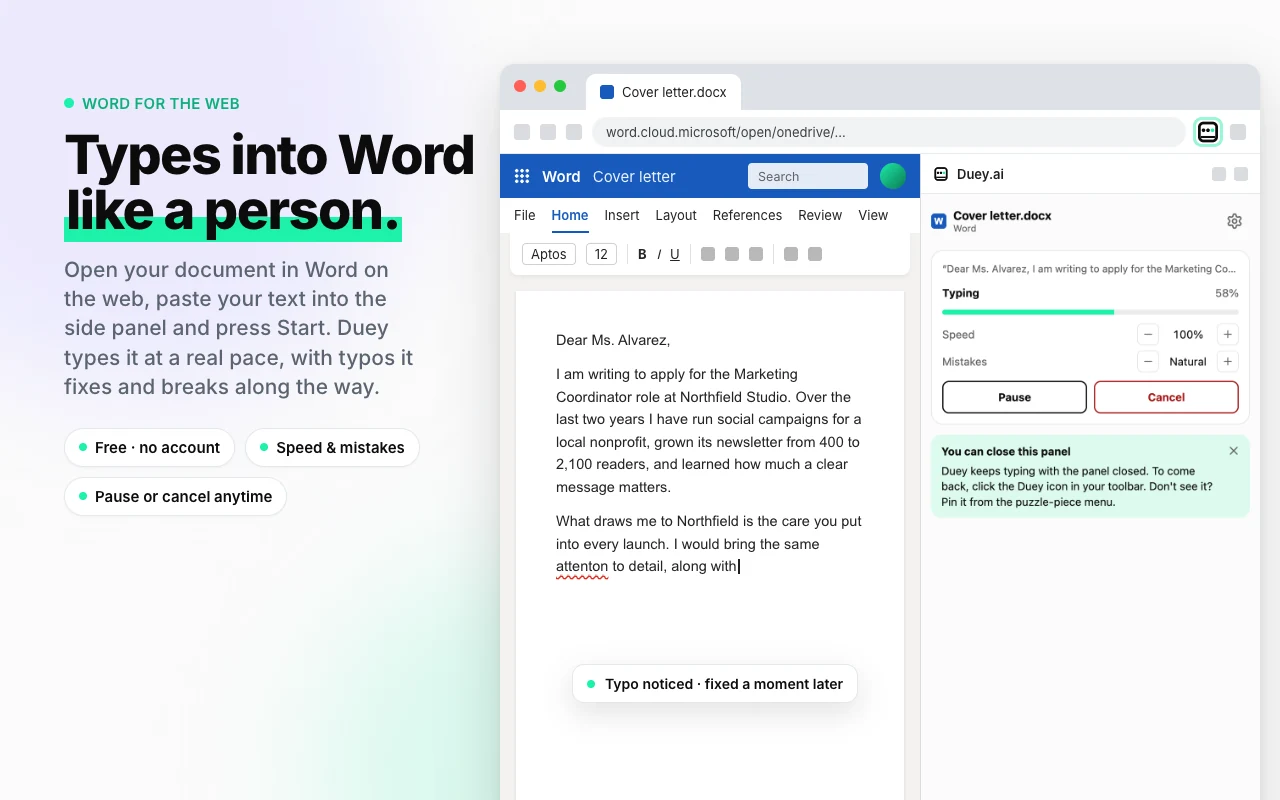
Open your Word document in Chrome, paste your text and press Start. Duey types it in at a real pace, makes typos and fixes them, and takes breaks, so the document fills in over time instead of arriving in one paste.
Free in Word for the web · Personal, school and work accounts · Not the Word desktop app
How it works
Duey works in Word for the web, the version of Word that runs in Chrome.
- 1
Add Duey to Chrome
Install the free extension. No account needed.
- 2
Open your document in Chrome
Open it from OneDrive, SharePoint or Microsoft 365 in Chrome. Working in the Word app? Save the file to OneDrive and open it in your browser.
- 3
Click where the text should go
Click in the document so the cursor sits where you want Duey to start, then click the Duey icon to open the side panel.
- 4
Paste and press Start
Paste your text, pick your speed and mistakes, and press Start. Pause, slow down or stop any time from the panel.
Made for Word, not just Google Docs
Free in Word
Word used to be a paid extra. Now the free extension types in Word for the web with the same speed and mistakes controls as Google Docs.
Real paragraphs
New paragraphs are real Word paragraphs, not line breaks squeezed into one long paragraph.
Real pace, real typos
Duey types at an uneven, human pace, makes typos and goes back to fix them, and takes breaks along the way.
Stops if Word stops listening
If Word stops taking what Duey types, Duey pauses and the panel says how to fix it, instead of “finishing” over an unchanged document.
School and work accounts
Personal, school, work and Microsoft 365 Business accounts all work, whether the file lives in OneDrive or SharePoint.
Nothing on top of your document
Duey lives in Chrome’s side panel, so the Word ribbon and your document stay exactly as they are.
Good to know
- Word for the web only. Duey runs in Chrome, so it doesn't type into the Word desktop app on Windows or Mac.
- Plain text in Word. Bold, headings, lists and links are typed as plain text, and Duey shows a note if your text has formatting. Style the document afterwards.
- Keep the tab open and active while Duey types.
- Multi-block, sittings and Replay aren't available in Word. For a document with several sections, run Duey once per section, or use Multi-block in Google Docs.
- Government and China clouds (GCC, GCC High, DoD and 21Vianet) aren't supported yet.
- PowerPoint too. Duey also types into PowerPoint for the web.
Duey Pro
Typing that reads as your own hand
Auto Typer Pro works in Word for the web too. It types at your own measured tempo, pauses to think, and fixes typos the way a person does.
Get Duey ProAlready subscribed? Add Auto Typer Pro to Chrome →See what Pro does →Questions
Is there a free auto typer for Microsoft Word?
Yes. The free Duey extension types into Word for the web in Chrome, with speed and mistakes controls. You don’t need an account.
Does it work in the Word desktop app?
No. Duey is a Chrome extension, so it types into Word for the web. Save your file to OneDrive, open it in Chrome, and Duey can type into it there. The file is still a normal Word document you can open in the app afterwards.
Does it work with my school or work Microsoft account?
Yes. Personal, school, work and Microsoft 365 Business accounts use the same Word for the web, and Duey works in all of them. Government and China clouds aren’t supported yet. Your Duey account is separate from your Microsoft account.
Will it keep my headings and bullet points?
Not in Word. Duey types plain text there and shows a note before you start if your text has formatting, so you can style it afterwards. Paragraphs are kept.
Duey stopped and says typing isn’t reaching the document. What now?
Check that you can edit the document (not view-only), click back into it where the text should go, then press Resume.
More troubleshooting →What do I need?
Chrome on Mac, Windows, Linux or a Chromebook, and a Word document you can edit in the browser. Auto Typer Pro needs Duey Pro.
Full requirements →Paste, click Start, walk away.
Free in Word for the web · Personal, school and work accounts · Not the Word desktop app